
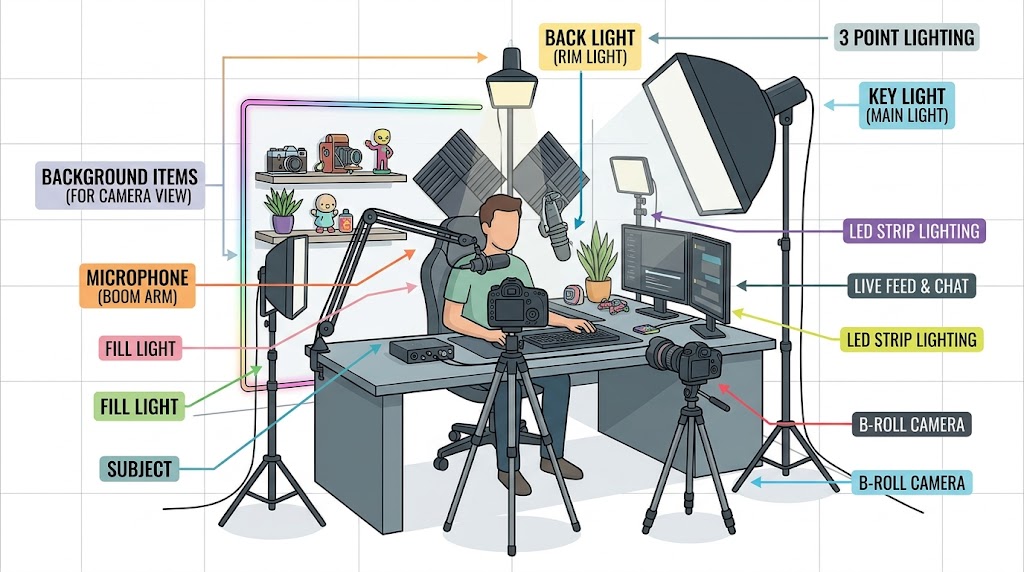
This home studio setup is designed to meet the demands of livestreaming and professional content creation, incorporating the essential components for high-quality production:
- Three-Point Lighting System: This diagram shows a classic setup to ensure the subject is well-lit and separated from the background.
- Key Light: The primary light source, angled from the front-right to illuminate the subject.
- Fill Light: Positioned to the front-left to soften shadows created by the Key Light.
- Back Light (Rim Light): Placed behind the subject to create a highlight on their hair and shoulders, separating them from the background.
- Dual Camera Setup:
- Main Camera: Positioned directly in front of the subject for primary engagement with the audience.
- B-Roll Camera: Placed on a side tripod to capture alternative angles and close-up details.
- Audio Recording:
- A broadcast microphone on an articulated boom arm is positioned just outside the main camera frame to capture clear, professional audio.
- Visual Interest:
- The subject’s position is clearly marked behind the desk.
- The background includes depth-adding elements like acoustic foam panels, LED strip lighting, and a display shelf with personal and technical props to enhance the visual appeal of the livestream.
FAQ
Livestreaming and Content Creation Studio FAQ
What equipment do I need to start a livestreaming studio?
A basic livestreaming setup typically includes:
- A camera (webcam or mirrorless camera)
- A microphone for clear audio
- Good lighting (such as LED panel or ring lights)
- A computer capable of handling video encoding
- Streaming software such as OBS Studio or Streamlabs
- A stable internet connection
Many creators start with a simple webcam and microphone and upgrade their equipment over time as their channel grows.
Is a webcam or mirrorless camera better for streaming?
Both options work well, but they serve different needs.
Webcams
- Simple plug-and-play setup
- Affordable
- Built-in autofocus and exposure control
- Examples include the Logitech Brio 4K Webcam and Elgato Facecam
Mirrorless cameras
- Larger sensors and better image quality
- Interchangeable lenses
- Better depth-of-field and cinematic look
Popular mirrorless cameras used by streamers include the Sony ZV‑E10 and Canon EOS M50 Mark II.
What is “clean HDMI output” and why does it matter?
Clean HDMI output means the camera sends video without overlays like battery icons, focus boxes, or menus.
This is important when connecting a camera to a capture card so viewers see only the video feed. Cameras such as the Sony ZV‑E10 and Panasonic Lumix GH5 offer clean HDMI output specifically designed for video creators.
How important is audio quality for streaming?
Audio quality is often more important than video quality. Viewers will tolerate lower video resolution, but poor audio can cause them to leave quickly.
Many creators use USB microphones such as the Blue Yeti USB Microphone or the Elgato Wave:3 to improve sound clarity.
What kind of lighting works best for a home studio?
Good lighting dramatically improves video quality.
Common options include:
- Ring lights for face lighting
- LED panel lights for studio setups
- Softboxes for diffused light
Many content creators use adjustable lights like the Elgato Key Light because they can be controlled from a computer or smartphone.
What computer specs are recommended for streaming?
A modern computer with a multi-core processor works best.
Recommended specs include:
- Quad-core or higher CPU
- 16GB RAM
- SSD storage
- Dedicated GPU (optional but helpful)
Streaming software like OBS Studio can also use hardware encoders on graphics cards from NVIDIA or AMD to reduce CPU load.
Can I livestream using just a smartphone?
Yes. Modern smartphones can stream directly using apps provided by platforms like YouTube and Twitch.
However, many creators eventually move to a computer-based setup for better control, overlays, and production quality.
What are some common beginner mistakes when setting up a streaming studio?
New creators often run into a few common issues:
- Poor lighting that creates shadows or grainy video
- Using built-in laptop microphones instead of dedicated mics
- Slow or unstable internet connections
- Cluttered backgrounds that distract viewers
- Not testing audio and video before going live
Taking time to test your setup and improve lighting and sound can dramatically improve production quality.
How do I stop my room from sounding like a cave?
Hard surfaces (walls, desks, windows) reflect sound. You can minimize echo by:
Using “soft” decor like curtains or bookshelves to break up sound waves.
Adding acoustic foam panels or bass traps.
Placing a rug on the floor.
Which software should I use to manage my stream?
OBS Studio: The industry standard. It is free, open-source, and highly customizable.
Streamlabs/vMix: Alternative options that offer more built-in widgets or professional broadcast features but may require more system resources.